Schrock Innovations Hiring in Lincoln – We Need Another Mac/PC Tech
- Comments: 4
- Written on: December 18th, 2009
Schrock Innovations had an amazing 2009 in Lincoln and we need another technician to continue building on that success.
We posted an advertisement on Craigslist, and we ask that qualified candidates please apply on our website rather than in person or calling by phone.
What are we looking for?
We need a technician that is proficient with PC and Mac troubleshooting who can work alone in the field or in the service center as part of a team.
We are expanding our on-site hours to include weekends. We have also taken on a umber of corporate clients in Lincon and Omaha who use Mac and we need more than one technician on staff to handle the workload.
We need a tech who already knows troubleshooting and is experienced with all versions of Windows and Mac OS. Of course we will train on Schrock procedures, but we need someone who has the skills to do the job on day one for this position.
USB 110-volt Outlet an AWESOME Idea!
- Comments: 14
- Written on: December 9th, 2009
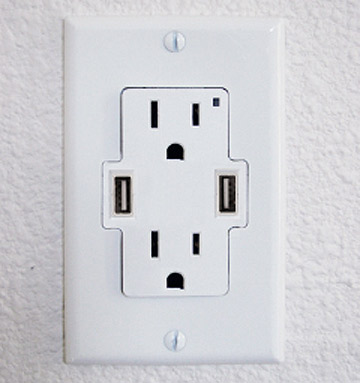 I saw this USB power outlet online and I honestly will be installing a couple of these in my home office!
These are standard 110-volt outlets with two additional USB ports built right in. This would allow me to charge my iPhone, video camera, and the host of other USB devices I use in one convenient place!
They are a little pricey for outlets at $10 each, but cool nevertheless!
Six Essential Microsoft Updates Releasing Today – All Windows & Office Users Impacted
- Comments: 14
- Written on: December 8th, 2009
 Microsoft is releasing six new updates today that will impact all Windows users in some way.
The updates, scheduled to be automatically downloaded and installed tonight on most Windows systems, patch severe security issues in Internet Explorer 7, Internet Explorer 8, and Microsoft Office. Because of the Internet Explorer 7 component, just about every Windows System made after 2001 will be impacted.
This set of updates will address a critical security flaw that could allow users to take control of your computer, so it is important you get these installed.
If your computer is having trouble installing updates for any reason, contact us in Lincoln or Omaha, or seek the assistance of a technician who can get them installed before your computer is infected.
Windows 7 Black Screen of Death
an Echo Chamber Hoax
- Comments: 16
- Written on: December 7th, 2009
 Beginning over the Thanksgiving Holiday weekend and continuing until recently, a report by security company named Prevx published a blog post stating tat a coming Windows Update will render millions of Windows 7 PCs inoperable suffering from a “Black Screen of Death.”
Today, ZDNet has published an article explaining the details and the time line of events that lead to industry giants like PC World Magazine picking up the story as fact.
After further investigation and a near heart attack at Microsoft, Prevx recanted the story and claimed they were not responsible for the damage that was caused to Microsoft by its initial report. Their statement reads:
Regrettably, it is clear that our original blog post has been taken out of context and may have caused an inconvenience for Microsoft.
According to ZDNet, it looks like Prevx’s initial report was titled with the headline, “Black Screen woes could affect millions on Windows 7, Vista and XP.”
Major Tech Publications Punked
Computer World and PC World Magazine noticed the headline and without waiting for any corroboration or comment from Microsoft, ran with the headline “Latest Microsoft patches cause black screen of death.”
The fact of the matter is that after investigation, there is no problem and this is a prime example of how the Internet echo chamber can lead to an inflated story – especially when there is competition to break the story first online where seconds matter to search engines.
No Takebacks, No Way
The most shameful thing of all is that PC World and PC Magazine both refuse to change the old headlines that they now know to be wrong. That means they will be present in search engines for years to come, continuing to mislead and misinform the poor Windows 7 user with a VGA cable that fell out.
PC Performance May Not be What is Advertised – Welcome to Performance Throttling
- Comments: 13
- Written on: December 5th, 2009
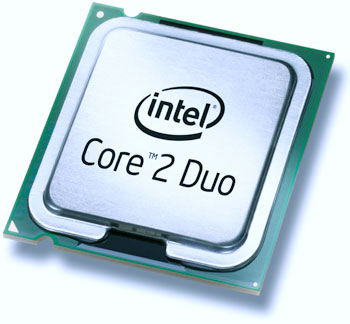 Have you ever wondered if your computer is giving you the actual speed and quickness that was advertised when you originally bought it?
In modern computers the advertised speed should really be considered the “up to” speed because few if any of the computers in the marketplace are actually giving you the advertised speed ratings – especially when they are being stressed with a difficult or time consuming task
What is PC Component Throttling?
It’s pretty easy to make PC component throttling sound more sinister than it is. The bottom line is that your computer is engineered to protect its self.
Its pretty much common knowledge that many PC BIOS chips today will adjust fan speed to match the heat being generated by the processor. This keeps the CPU cool under stress and prevents it from burning itself up.
The idea behind the technology (called SpeedStep in Intel based systems and Cool and Quiet in AMD based systems) is that to reduce the speed of the components in the computer to reduce heat when the fans are working at 100% and you are doing a really intense task like rendering video, playing a high-end game, or editing 50 high-resolution images in Photoshop at one time like my wife does.
If your computer is cooling at its maximum and that’s not enough, it will drop the speed until the temperature falls back to normal levels.
Why You Want / Don’t Want It
Views on PC Component throttling generally fall into two camps – high-performance junkies hate it because if it gets too hot they will just install more / better fans.
Average Joe users love it because there is literally no risk or burning up a processor or a motherboard because the computer was working too hard.
Throttling comes in extremely handy when dealing with notebook computers. Notebook computers throttle performance for heat management like desktops, but also for power consumption.
Have you ever noticed that more of your CD burns fail when you are on battery? Have you noticed that the speed of your computer drops by about 15% when you yank out that AC adapter? These are al measures to save battery power.
How to Throttle Your Computer to Maximum Speed
If you are a performance junkie and you want to punch your computer’s potential speed through the roof it’s pretty easy to do.
** WARNING **
These instructions involve editing your BIOS settings. The layout and available options contained within your BIOS< as well as the method of entering the BIOS will differ depending on the brand of computer you are using. Please don’t change these settings on a notebook or laptop computer, and only change them on a desktop PC if you are confident you have proper cooling. Failure to adhere to these warnings could result in permanent component damage to your system.
- To boost your computer’s speed, enter into the BIOS. This is typically accomplished by pressing F2, F10, or the DEL key on your keyboard as the computer is booting.
- Next locate the SteedStep or Cool and Quiet options in the BIOS (Typically under power management)
- Turn off Cool and Quiet (AMD processors) or SpeedStep (Intel Processors)
- If your board supports this, set your maximum CPU temperature to no more than 125 degrees. Anything hotter than this will almost certainly damage your processor. This acts like a partial safeguard against component damage.
Big Announcements Coming in the Days Ahead
- Comments: 0
- Written on: December 4th, 2009
I am very aware that I have been absent from writing here for many days. There has been a lot going on, so I thought I would mention a few of the things here briefly to tweak your curiosity and then come back with more detailed posts in the coming days.
Here’s a few of the things I have been up to:
- Entertained a bid from a group of investors interested in buying Schrock Innovations (and turned them away)
- Selling our current home and moving into a new 4500 square foot home in Papillion, NE (yes, right before Christmas)
- Laying the groundwork for an announcement about our weekly radio show, Compute This – If you like the show now, just wait until you hear what is coming next
- Closed down our Omaha, NE Service Center in preparation for building our new (and permanent) Omaha facility in 2010
- Assisting in the development of a new Website Marketing Division at Three Eagles Communications
- Preparing for the official launch of the Top IT Shop Consulting Website
- Teaching my son Jake how to play Wii Boxing 🙂
Its a lot, but I wouldn’t have it any other way. More updates to come in the upcoming days!